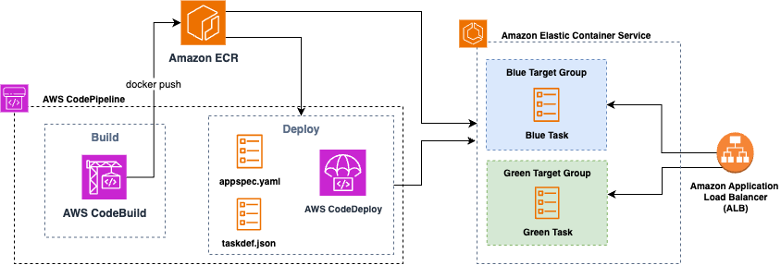
March 2026: This post has been updated to reflect that Amazon ECS now supports canary and linear deployment strategies natively as of October 2025. The recommendation has been updated accordingly to reflect ECS-native as the default choice for new deployments.
Blue/green deployments on Amazon Elastic Container Service (Amazon ECS) have long been a go-to pattern for shipping zero-downtime deployments. Historically, the recommended approach in the AWS Cloud Development Kit (AWS CDK) was to wire ECS to AWS CodeDeploy for traffic shifting, lifecycle hooks, and tight integration with AWS CodePipeline.
In July 2025, Amazon ECS launched built-in blue/green deployments. This allows you to operate directly within the ECS service, without requiring the use of Amazon CodeDeploy. In October 2025, Amazon ECS further enhanced this capability by adding support for canary and linear deployment strategies, achieving feature parity with CodeDeploy.
This post explains what changed, how the new ECS-native blue/green model compares to CodeDeploy, and how to decide which path to take in your CDK projects.
Figure1: Amazon ECS blue/green deployment with AWS CodeDeploy
In a blue/green deployment, two production environments are maintained: blue, the current environment, and green, the new environment. This strategy allows you to validate the new version of your environment before it receives production traffic.
The ECS service team saw an opportunity to simplify the deployment process by creating lifecycle hooks, bake time, and managed rollback directly within ECS. With this shift, the complexity of coordinating blue/green deployments through CodeDeploy is consolidated into a single service. This consolidation not only simplifies the deployment pipeline but also reduces the number of moving parts, making it easier to maintain and troubleshoot over time.
Conceptually, ECS-native blue/green provisions a replacement task set registered to a separate target group (blue target group in figure 2) behind your Elastic Load Balancing listener. When you approve the cutover, ECS performs a traffic shift to the green revision (green target group in figure 2) using your chosen strategy (all-at-once, canary, or linear), then holds both revisions during a configurable bake period before retiring blue or rolling back if alarms or hooks fail.
Figure 2: Amazon ECS Native Blue Green Deployment
With CDK, you now have two ways to achieve blue/green on ECS. One is the ECS-native path that keeps deployment configuration on the CDK ECS module and its related load balancer resources. You configure lifecycle hooks that invoke AWS Lambda functions at specific deployment stages, you set a bake time, and you optionally use a test listener or Amazon ECS Service Connect header rules to validate traffic to the green revision before production cutover. The CodeDeploy path creates a CodeDeploy application and deployment group bound to your ECS service and Application Load Balancer (ALB), lets you choose canary, linear, or all-at-once policies, and typically plugs into AWS CodePipeline for orchestration.
Both ECS-native and CodeDeploy now support all three traffic shifting strategies: all-at-once, canary, and linear. ECS-native launched support for canary and linear deployments in October 2025, eliminating the functional gap that previously existed. Both options allow you to control how your new version is progressively exposed to production traffic, with configurable step percentages and bake times between traffic shifts.
Currently, the AWS CDK includes L2 support for ECS-native blue/green so that you can model these settings directly without custom CloudFormation or escape hatches. If your stack already uses the Deployment Controller Type. CODE_DEPLOY path, you can continue to do so; migration options exist (outlined later in this post).
Figure 3: Amazon CodeDeploy blue/green deployment traffic shift
Use ECS-native when:
Use CodeDeploy when:
To utilize ECS-native blue/green in CDK, start with an Amazon ECS service (Fargate or EC2), an Application Load Balancer, and two target groups managed by ECS during deployments. In your service definition, you’ll opt into the blue/green deployment type, set a bake time, and attach lifecycle hooks. Hooks can run Lambda functions at stages such as before scale-up or after production traffic shift, letting you run synthetic tests, warm caches, or gate on external checks. If you’re using Amazon ECS Service Connect, you can route “dark” test traffic to green by sending requests with a specific header during the pre-cutover phase.
Code Snipped: Amazon ECS service with AWS Fargate and AWS CodeDeploy
ECS-native blue/green deployments is now the recommended option for most teams and new projects. With full support for canary and linear deployments alongside all-at-once strategies, it provides zero-downtime cutovers, lifecycle hooks, bake time, and rollback capabilities without requiring management of additional services.
CodeDeploy remains a valid option for existing customers or those with specific CodePipeline dependencies and established governance processes, but AWS’s direction is to migrate toward ECS-native for new deployments.
Bring your ECS deployments to the next level by enabling Blue/Green deployment with the strategy that best fits for your use case. For step-by-step instructions for migrating from CodeDeploy to ECS-Native, refer to the official migration guide.
For more information on the new canary and linear deployment capabilities, see the Amazon ECS documentation on blue/green deployments.
Franco Abregu is a Sr. Delivery Consultant – DevOps at AWS Professional Services based in Argentina. Franco focuses on transforming customers DevOps culture to improve developer productivity, operations, deployments and process standardization. His expertise includes CI/CD, Infrastructure as Code, software development and organizational adoption of DevOps culture.
is a Sr. Solution Architect within the AWS Defense and Aerospace organization. Outside of work, he enjoys a balance of warm weather and traveling.