Organizations often face challenges with the manual classification of data assets, which can be inefficient and inconsistent. The new Amazon SageMaker Catalog offers a solution by automating this process, ensuring that business terms are applied uniformly across teams.
This automated classification feature suggests relevant business glossary terms during data publishing, significantly reducing the manual tagging workload. By analyzing table metadata and schema information, it provides AI-generated recommendations for terms defined in organizational glossaries, including both functional terms and sensitive data classifications like PII and PHI.
Key benefits of this automated classification include:
- Improved Consistency: Standardized vocabulary across data assets enhances discoverability for business users.
- Streamlined Workflow: The classification process integrates directly into the publishing workflow, eliminating the need for separate ETL processes.
- Dynamic Recommendations: The system adapts to asset attributes and context, generating relevant suggestions that improve over time.
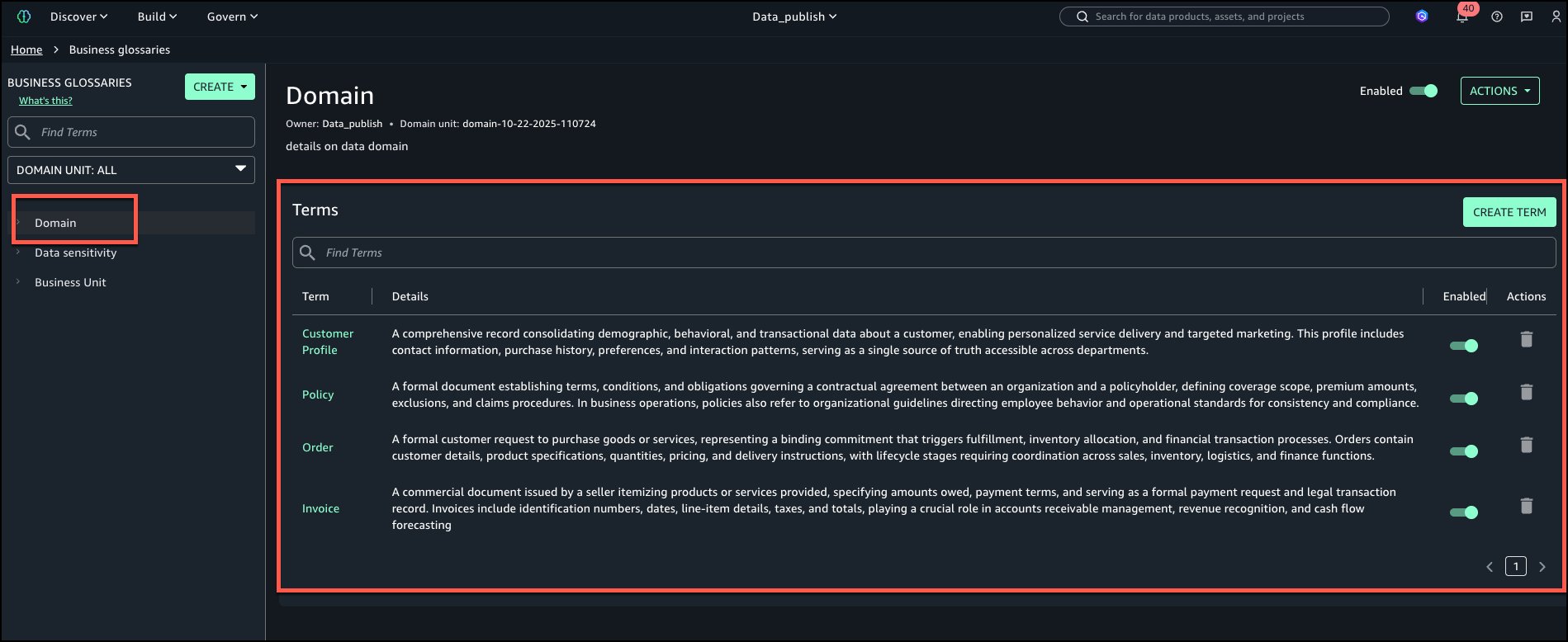
To implement this feature, users must have an Amazon SageMaker Unified Studio domain set up. Following the setup, high-quality glossary entries should be created to ensure accurate AI recommendations. Examples of business glossaries include:
- Domain: Customer Profile, Policy, Order, Invoice
- Data Sensitivity: PII, PHI, Confidential, Internal
- Business Unit: KYC, Credit Risk, Marketing Analytics
Once the glossary is established, users can create tables in Amazon Redshift and add them to the project inventory. The system will analyze the asset metadata and context to automatically generate relevant terms, which can be reviewed and accepted before publishing.
By adopting this automated classification approach, organizations can enhance metadata consistency, reduce the time spent on manual corrections, and improve overall data discoverability. This integration allows data teams to focus more on utilizing data rather than fixing it.
For more details on utilizing Amazon SageMaker Catalog, refer to the official User Guide.