High-performance applications, such as those requiring CPU-intensive processing or memory-heavy analytics, often need more reliable compute resources than standard AWS Lambda setups can provide. AWS Lambda Managed Instances (LMI) allows you to run Lambda functions on specific Amazon EC2 instance types, while still using the familiar Lambda programming model.
With LMI, you can select from over 400 Amazon EC2 instance types, including general purpose, compute optimized, and memory optimized options, to better align with your workload needs. AWS Lambda manages essential tasks like instance lifecycle management, operating system updates, and automatic scaling, providing your teams with enhanced control and reducing operational overhead.
Setting Up AWS Lambda Managed Instances
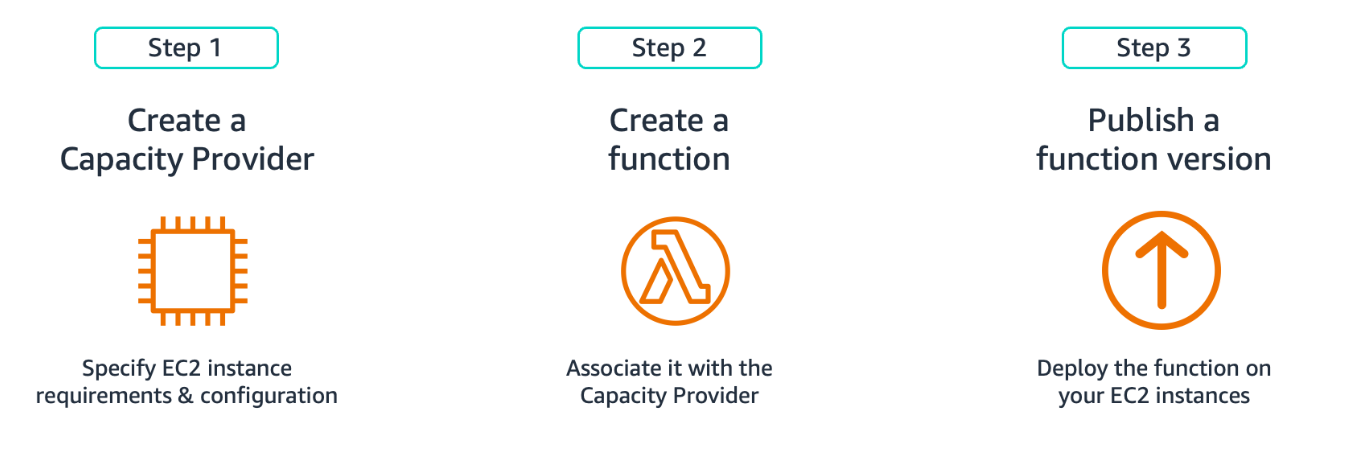
To configure AWS Lambda Managed Instances, you will create a Capacity Provider. This provider outlines your compute infrastructure and includes:
- An IAM role (Capacity Provider Operator Role) that allows Lambda to manage instances.
- Your VPC setup, including subnets and security groups.
Follow the AWSLambdaManagedEC2ResourceOperator policy to create this role while adhering to the Principle of Least Privilege.
Capacity Provider Configuration
When creating a Capacity Provider, you will define:
- Instance types and scaling behavior.
- Network placement across multiple subnets in different Availability Zones for high availability.
- MaxVCpuCount to manage compute capacity and control costs.
Lambda supports three EC2 instance families for LMI:
- C: Compute optimized for CPU-intensive tasks.
- M: General purpose for balanced workloads.
- R: Memory optimized for large datasets.
Lambda automatically scales instances based on CPU utilization, either in automatic or manual mode, depending on your workload requirements.
Function Creation and Invocation
Creating an LMI function is similar to creating a standard Lambda function, with the key difference being the specification of CapacityProviderConfig to link your function to the Capacity Provider. Ensure to publish a function version before invoking it to prepare the execution environments.
Once published, your function can be invoked using standard methods, including direct invokes and event source mappings.
Monitoring and Best Practices
Lambda provides CloudWatch metrics at both the capacity provider and execution environment levels. Monitor metrics like CPUUtilization and ExecutionEnvironmentConcurrency to optimize performance and prevent throttling.
To ensure reliable performance:
- Ensure your code is thread-safe to avoid issues under concurrent loads.
- Utilize asynchronous patterns for I/O-bound workloads.
- Test your code under concurrent execution to identify potential issues.
AWS Lambda Managed Instances offer a powerful solution for high-performance workloads while maintaining the simplicity of serverless architecture. To see LMI in action, you can deploy the Monte Carlo risk simulation example from GitHub.