Amazon MSK Serverless allows users to run Apache Kafka without the hassle of managing cluster capacity. This service automatically provisions and scales resources, ensuring seamless data streaming without the need for constant adjustments. It is fully compatible with Apache Kafka, enabling the use of any compatible client applications.
For private connectivity, MSK Serverless utilizes AWS PrivateLink, which supports connections to up to five virtual private clouds (VPCs) within the same AWS account. For scenarios requiring connectivity across more than five VPCs or between different accounts, options like VPC peering or AWS Transit Gateway are typically necessary, as detailed in Secure connectivity patterns for Amazon MSK Serverless cross-account access.
Aklivity Zilla Plus for Amazon MSK acts as a stateless Kafka-native edge proxy, allowing authorized Kafka clients from various VPCs, even across accounts, to securely connect and interact with MSK Serverless clusters using a custom domain name.
This article outlines how Kafka clients can leverage Zilla Plus for secure access to MSK Serverless clusters via Identity and Access Management (IAM) authentication over PrivateLink. Additionally, we will explore how to set up a custom domain for your MSK Serverless cluster.
Architecture Overview
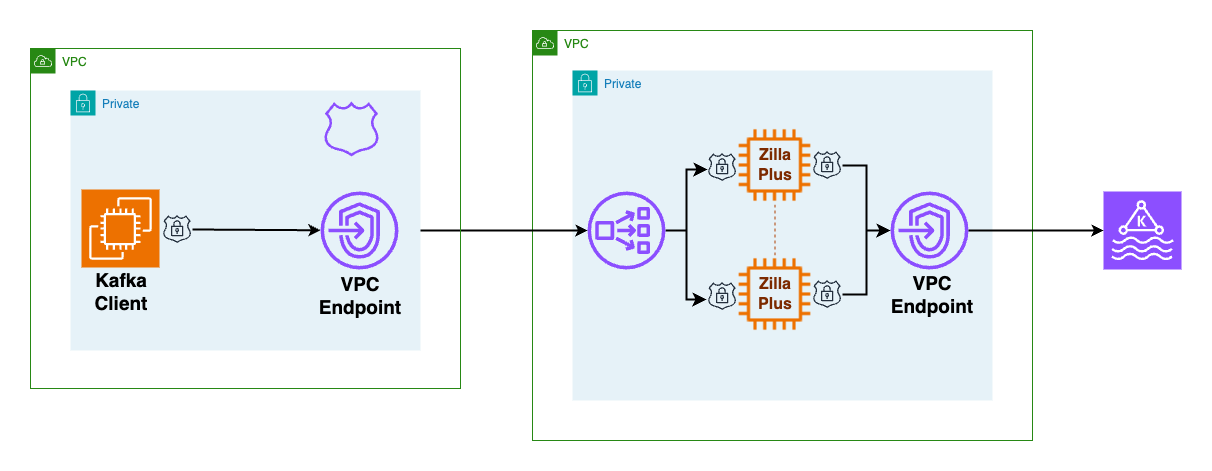
Network Load Balancers (NLBs) simplify the definition of remote connectivity to MSK Serverless clusters from other VPCs. In the architecture, Zilla Plus is deployed within an auto-scaling group, accessible as a target group behind an NLB. It connects to the MSK Serverless cluster through a designated VPC endpoint.
To facilitate this, Zilla Plus is configured with an AWS Certificate Manager (ACM) wildcard certificate for your custom domain. By establishing a Zilla Plus VPC Endpoint Service, the MSK Serverless cluster becomes accessible from other VPCs.
Client Configuration
The client VPC requires minimal setup, including a Zilla Plus VPC endpoint for accessing the Zilla Plus VPC Endpoint Service and an Amazon Route 53 local zone that maps your custom domain to the Zilla Plus VPC endpoint.
When creating an MSK Serverless cluster, a bootstrap broker address is generated, such as boot-xxxxxxxx.yy.kafka-serverless.region.amazonaws.com:9098, which is only resolvable within the original VPC.
To connect from another VPC or account, Kafka clients utilize a custom domain exposed by Zilla Plus, like boot.my.custom.domain:9098. The Route 53 DNS in the client VPC directs this custom domain to a VPC endpoint (NLB), which forwards traffic to Zilla Plus, presenting the appropriate ACM wildcard certificate.
Connection Process
When a Kafka client needs to connect to a cluster, it follows a two-step discovery process to identify the brokers. Initially, the client connects to any broker using the bootstrap server address to request topic metadata, which includes the addresses of brokers responsible for specific topics.
Subsequently, the client connects directly to the identified brokers. The connection flow involves the Kafka client reaching the Zilla Plus VPC NLB, which routes requests to Zilla Plus instances. Zilla Plus completes the TLS handshake and routes the requests to the MSK Serverless bootstrap server, intercepting and rewriting broker addresses to map them to the custom domain.
Deployment and Verification
Follow the steps in the Aklivity Zilla Plus documentation to deploy this solution using the AWS Cloud Development Kit (AWS CDK), which automates the setup, including the client VPC configuration for the VPC endpoint and Route 53 DNS entries.
Once the secure access scenarios are successfully deployed, you can verify remote access to the MSK Serverless cluster from any Kafka client using the custom domain bootstrap server.
On-Premises Access
For on-premises Kafka clients, the client VPC can connect through an AWS Client VPN endpoint. By configuring the AWS Client VPN endpoint to utilize the client VPC DNS server, connections will automatically resolve the custom domain bootstrap server hostname and route through Zilla Plus to MSK Serverless.
With Zilla Plus, you can efficiently manage access to one or more Amazon MSK Serverless clusters from various remote client VPCs, each using a unique custom domain. This setup supports clients from different AWS accounts while maintaining fine-grained AWS Identity and Access Management (IAM) authorization for topics and consumer groups.
Importantly, Zilla Plus requires no changes to the MSK Serverless cluster configuration, ensuring that existing Kafka clients continue to function without interruption.
For further information, visit Zilla Plus for Amazon MSK on AWS Marketplace and refer to the Aklivity Zilla Plus documentation.
Subham is a Senior Streaming Solutions Architect at AWS in the UK, specializing in streaming architectures. He enjoys spending time with his two daughters and solving jigsaw puzzles.
John is the Chief Technical Officer at Aklivity in California, contributing to the Zilla open-source project to connect applications to Apache Kafka.