Amazon Managed Workflows for Apache Airflow (Amazon MWAA) offers powerful orchestration for data workflows. However, managing DAG permissions at scale can be challenging. As organizations expand their workflow environments, the manual assignment of user permissions can become a significant bottleneck, affecting both security and productivity.
Traditional methods often necessitate manual configuration of role-based access control (RBAC) for each DAG, leading to:
- Increased administrative workload
- Potential security vulnerabilities
- Reduced efficiency
While custom RBAC roles can be defined as outlined in the Amazon MWAA User Guide, this method does not utilize Airflow tags.
This article demonstrates how to use Apache Airflow tags to automate DAG permission management, alleviating operational burdens while ensuring robust security controls.
Implementation Requirements
To implement this solution, you will need:
- AWS resources
- Permissions
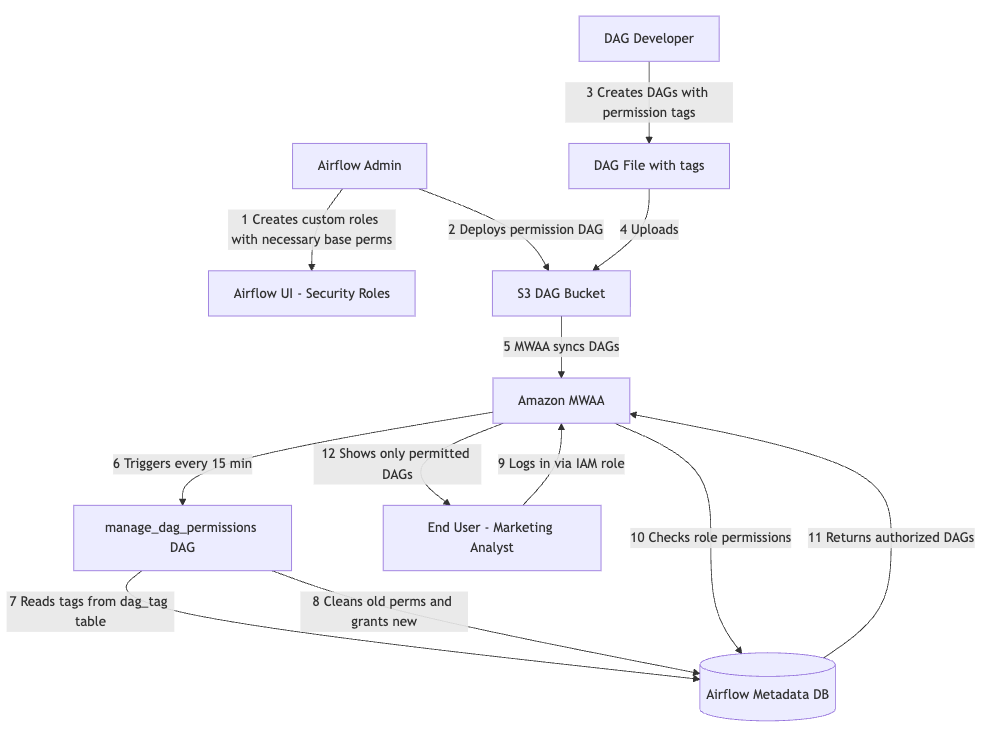
The automated permission management system consists of four key components that work together to provide scalable and secure access control. The following diagram illustrates the workflow of this solution.
Setting Up Permissions
Our solution builds on the existing IAM integration of Amazon MWAA, enhancing functionality through custom automation:
- Establish a mapping between your IAM principals and Apache Airflow roles.
- Create a DAG that will automatically manage permissions based on tags.
- Tag your DAGs for access control: Assign appropriate tags to your DAGs to specify which roles should have access.
Tags define which roles can access the tagged DAGs. The permissions granted (e.g., can_read, can_edit, can_delete) are configurable per role in the role_mappings configuration within the permission management DAG.
Note: Before this DAG can manage permissions for a custom role, the role must be manually created in the Apache Airflow UI (Security > List Roles) with the Viewer role’s permissions copied.
Troubleshooting Common Issues
Here are some common symptoms and their solutions:
- Symptom: Permission sync DAG fails with database errors.
Cause: Insufficient permissions on MWAA execution role.
Solution: Ensure the execution role hasairflow:CreateWebLoginTokenpermission and database access. - Symptom: DAG tags are present but permissions aren’t updated.
Solution: Verify that the DAG is active and parsed successfully. Review permission sync DAG logs for errors. - Symptom: Users with correct IAM roles cannot see DAGs.
Solution: Check IAM to Apache Airflow role mapping and ensure the permission sync DAG has run successfully. - Symptom: Permission sync takes too long or times out.
Solution: Reduce sync frequency for large environments and consider batching permission updates.
Benefits of Automated Permission Management
Automating permission management provides significant operational advantages, including:
- Reduced administrative overhead
- Improved security through consistent application of least-privilege principles
- Enhanced developer experience with automatic access provisioning
This system can support environments with over 500 DAGs without performance degradation.
Key Security Practices
When implementing these systems, adhere to essential security practices:
- Apply the principle of least privilege
- Validate tags to ensure only authorized tags are processed
- Establish comprehensive audit mechanisms, including CloudTrail logging
Restrict permission management functions to administrators and maintain appropriate role separation for different user personas.
Considerations and Cleanup
Be aware of technical limitations during implementation. IAM-based access control to Amazon MWAA is limited to Apache Airflow default roles, and permission changes may experience delays due to DAG schedules. Establish approval processes for production changes and maintain version control for permissions.
After experimentation, ensure to clean up resources.
In summary, this post outlined how to automate DAG permission management in Amazon MWAA using Apache Airflow’s tagging system. You learned to implement tag-based access control that scales efficiently while maintaining least-privilege security principles. Explore this solution in your Amazon MWAA environment, starting with a development setup before rolling it out to production.
About the Authors
Amey Ramakant Mhadgut is a Software Engineer at Audible, specializing in data and AI applications. He enjoys running, swimming, and traveling.
Sarat Chandra Vysyaraju is a Software Development Manager at Audible, focusing on empowering data customers. He enjoys cooking and exploring new places.