Organizations are finding significant value using an integrated experience for all your data and AI with Amazon SageMaker Unified Studio. However, many organizations require strict network control to meet security and regulatory compliance requirements like HIPAA or FedRAMP for their data and AI initiatives, while maintaining operational efficiency.
In this post, we explore scenarios where customers need more control over their network infrastructure when building their unified data and analytics strategic layer. We’ll show how you can bring your own Amazon Virtual Private Cloud (Amazon VPC) and set up Amazon SageMaker Unified Studio for strict network control.
The solution covers complete technical know-how of a fully private network architecture using Amazon VPC with no public internet exposure. The approach leverages AWS PrivateLink through VPC endpoints to provide a secure communication between SageMaker Unified Studio and essential AWS services entirely over the AWS backbone network.
The architecture consists of three core components: a custom VPC named airgapped with multiple private subnets distributed across at least three Availability Zones for high availability, a comprehensive set of VPC interface and gateway endpoints for service connectivity, and the SageMaker Unified Studio domain configured to operate exclusively within this isolated environment. This design helps ensure that sensitive data never traverses the public internet while maintaining full functionality for data cataloging, query execution, and machine learning workflows.
By implementing this network-isolated configuration, organizations gain granular control over network traffic, simplified compliance auditing, and the ability to integrate SageMaker Unified Studio with existing private data sources through controlled network pathways. The solution supports both immediate operational needs and long-term scalability through careful IP address planning and modular endpoint architecture.
The set up requires you to have an existing VPC (for this post, we’ll refer to the name as airgapped but in reality, it refers to the VPC you would like to securely set up SageMaker Unified Studio). If you don’t have an existing VPC, you can follow SageMaker Unified Studio domain quick create administrator guide to get started.
The high level steps to create a VPC meeting minimum requirements for SageMaker Unified Studio are as follows:
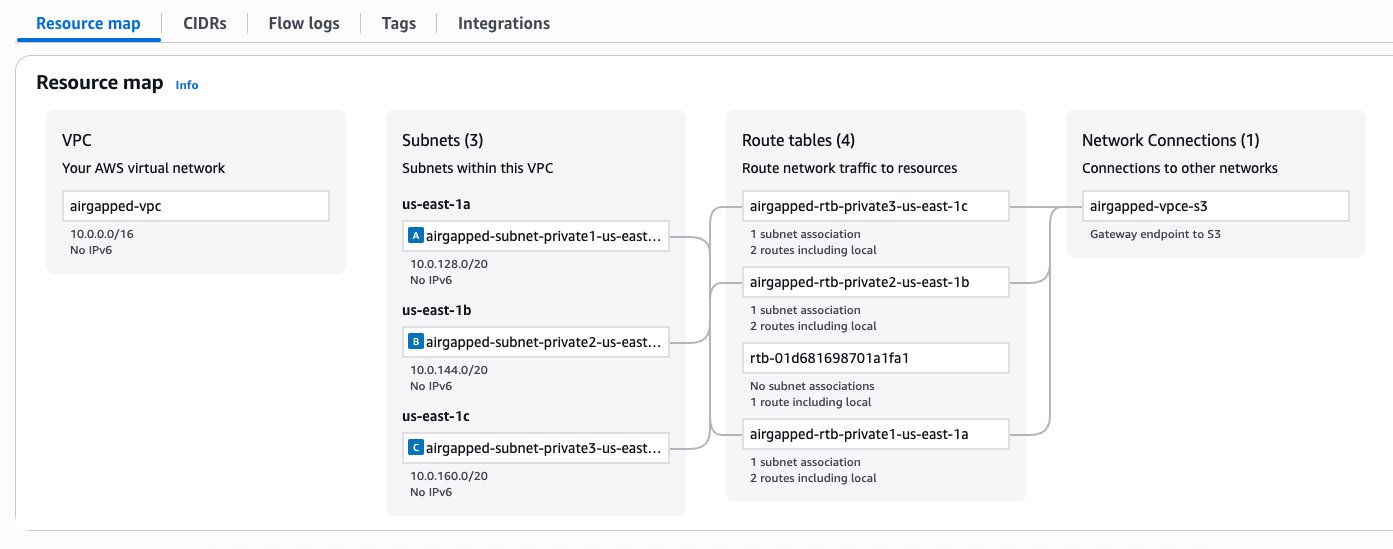
This produces the following VPC resource map:
Figure 1 – VPC configuration
Now, we will set up SageMaker Unified Studio in an existing VPC, named airgapped-vpc.
Figure 2 – Amazon SageMaker Unified Studio URL Welcome Page
These are the minimum set of VPC endpoints to allow using the tooling within SageMaker Unified Studio. For a list of other mandatory and non-mandatory VPC endpoints refer to the tables in the latter part of this post.
To create an interface endpoint, complete following steps:
Figure 4 – Interface Endpoint creation wizard for AWS Service datazone
Figure 5 – Interface Endpoint creation wizard network settings
For a successful domain and project which does not get into any service level usage, the mandatory VPC endpoints to be created are: S3 Gateway, DataZone, and STS interface endpoints. For other service usage dependent operations like authentication, data preview and working with compute, you would require other mandatory service specific endpoints explained later in this post.
When setting up SageMaker Unified Studio domain and project profiles, you need to specify the VPC network, subnets, and security groups. Here are some best practices around IP allocation, usage volume and expected growth to consider for different use cases within enterprises.
Production and enterprise use cases
If your organization require strict network control to meet security and compliance requirements for data and AI initiatives, consider following best practices in your production environment.
Testing and non-production use cases
For development, testing, non-prod environment where use cases don’t have stringent security and compliance requirements, use automated setup for quick experiments. Use sample CloudFormation github templates as part of the SageMaker Unified Studio express set up, to automate domain and project creation. However, this includes an Internet Gateway which may not be suitable for security-sensitive environments.
Private networking use cases
VPCs with private subnets require essential service endpoints to allow client resources like Amazon EC2 instances to securely access AWS services. The traffic between your VPC and AWS services remains within AWS network avoiding public internet exposure.
External data source access use cases
Consider the following when working with external systems like third-party SaaS platforms, on-premises databases, partner APIs, legacy systems, or external vendors.
In this section, we provide details of each networking aspect starting with choice of VPCs, network connectivity details for integrated services to work, the basis of VPC and subnet requirements, and finally the VPC endpoints required for private service access.
At a high level, you have two options to supply VPCs and subnets:
Figure 6 – Create VPC button in SageMaker Unified Studio Create Domain Wizard
The exact cost depends on the configuration of your VPC. For more complex networking set ups (multi-VPC), you may need to use additional networking components such as a Transit Gateway, Network Firewall, and VPC Lattice. These components may incur charges, and cost depends on usage and AWS Region. Interface VPC endpoints are charged per availability zone. They also have a fixed and a variable component in the pricing structure. Use the AWS Pricing Calculator for a detailed estimate.
With regards to connectivity to the underlying AWS services integrated within SageMaker Unified Studio, there are two ways to enable connectivity (these are not Studio specific, these are standard ways to enable network connectivity within a VPC). This is an important security consideration that depends on your organization’s security policies.
In a private networking scenario, you will need to consider whether you need connectivity to non-AWS resources in a way that’s compliant with your organization’s security policies. A few examples include the following:
If you need to connect to data sources outside of AWS (such as Snowflake, Microsoft SQL Server, Google BigQuery)
Enterprise network administrators must also complete either of the following prerequisites to handle private networking scenarios:
When setting up a new SageMaker Unified Studio Domain, it’s necessary to supply a VPC. It’s important to note that these VPC requirements are a union of all the requirements from the respective compute services integrated into Studio, some of which are reinforced by validation checks during the corresponding blueprint’s deployment. If these requirements that have validation checks are not fulfilled, the resource(s) contained in that blueprint may fail to create on project creation (on-create), or when creating the compute resource (on-demand). This section will present a summary of these requirements, as well as relevant documentation links from which they originate.
This section lists the compute services integrated in SageMaker Unified Studio that require VPC/subnets when provisioning the respective compute resources.
Compute Connections
Other Services
Requirements
If you choose to run SageMaker Unified Studio without public internet access, VPC endpoints are required for all services SageMaker Unified Studio needs to access. These endpoints provide secure, private connectivity between your VPC and AWS services without traversing the public internet. The following table lists the required endpoints, their types, and what each is used for.
Some endpoints may not show up directly in your browser’s network tab. The reason is that some of these services (such as CloudWatch) are transitively invoked by other services.
The following are required endpoints for SageMaker Unified Studio and supporting services to function properly. Gateway endpoints can be used where available, you can use interface endpoints for all other AWS services.
Only create these if the corresponding service is used in your environment.
AWS resources provisioned in your AWS accounts may incur costs based on the resources consumed. Make sure you do not leave any unintended resources provisioned. If you created a VPC and subsequent resources as part of this post, make sure you delete them.
The following service resources provisioned during this blog post need to be deleted:
In this post, we walked through the process of using your own existing VPC when creating domains and projects in SageMaker Unified Studio. This approach benefits customers by giving them greater control over their network infrastructure while using the comprehensive data, analytics, and AI/ML capabilities of Amazon SageMaker. We also explored the critical role of VPC endpoints in this set up. You now understand when these become necessary components of your architecture, particularly in scenarios requiring enhanced security, compliance with data residency requirements, or improved network performance.
While using a custom VPC requires more initial set up than the Quick Create option, it provides the flexibility and control many organizations need for their data science and analytics workflows. This approach provides a mechanism for your SageMaker environment to integrate with your existing infrastructure and adheres to your organization’s networking policies. Custom VPC configurations are a powerful tool in your arsenal for building secure, compliant, and efficient data science environments.
To learn more, visit Amazon SageMaker Unified Studio – Administrator Guide and User Guide.
Saurabh is a Principal Analytics Specialist Solutions Architect at AWS. He is passionate about new technologies. He joined AWS in 2019 and works with customers to provide architectural guidance for running generative AI use cases, scalable analytics solutions and data mesh architectures using AWS services like Amazon Bedrock, Amazon SageMaker, Amazon EMR, Amazon Athena, AWS Glue, AWS Lake Formation, and Amazon DataZone.
Rohit is a Senior Analytics Specialist Solutions Architect at AWS based in Dallas, Texas. He has two decades of experience architecting, building, leading, and maintaining big data platforms. Rohit helps customers modernize their analytic workloads using the breadth of AWS services and ensures that customers get the best price/performance with utmost security and data governance.
Baggio is a Software Engineer on the SageMaker Unified Studio team, where he designs and delivers experiences that empower data practitioners to build and deploy AI/ML workloads.