AWS Outposts extends AWS infrastructure, services, and APIs to customer-managed locations for workloads that require low latency, local data processing, or data residency. AWS has continuously improved the Outposts delivery and operational experience. However, managing the lifecycle from ordering through renewal has required coordination with multiple AWS teams for tasks like configuration, cost estimates, and end-of-term decisions.
With this feature launch, we have introduced self-service capabilities that give you direct control over the full Outposts lifecycle. A new configuration and quoting tool generates configurations with real-time cost estimates, so you can independently compare options and place orders. Subscription details, including term dates and billing, are now visible directly in the AWS Outposts console and through the AWS Command Line Interface (AWS CLI) or Outposts API. When your term ends, new workflows let you renew or decommission Outposts without contacting AWS.
In this post, we walk through each capability and show you how to get started.
The new quoting tool lets you build Outposts configurations, get real-time cost estimates, and place orders directly from the console or API.
Three capabilities make this powerful:
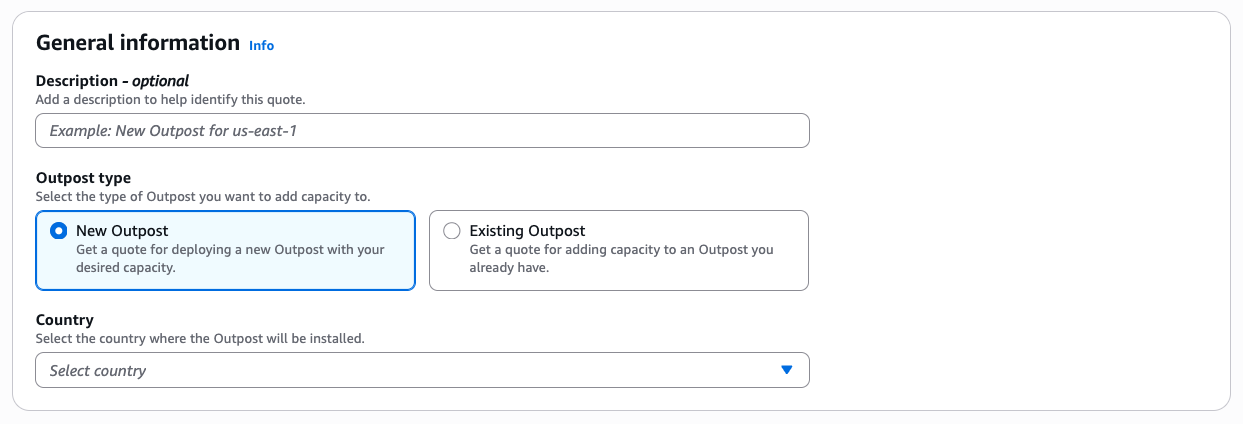
You can request quotes for new deployments or for adding capacity to existing Outposts. When you quote for an existing Outpost, your current capacity and configuration details are pre-populated. The tool integrates with AWS Identity and Access Management (IAM), so you can restrict who generates quotes using standard IAM policies.
The quote-to-order process follows three steps. First, get a quote by specifying your requirements. Next, place your order after reviewing cost estimates. Then, await delivery and installation. Quotes are generated within seconds and are valid for 30 days.
To generate a quote using the console, follow these steps:
Use the filter capability to narrow results by Outpost generation, form factor, vCPUs, or other properties. You can only select instance capacities from the same Outpost generation. When you add capacity, the wizard automatically calculates and displays total vCPUs and memory.
Storage is provisioned in fixed tiers. Your requested amount is rounded up to the nearest supported tier.
Although site details are optional for quotes, full site information (including operating address, shipping address, and rack physical properties) is required to place your order.
For capacity addition quotes, cost estimates are prorated to align with the remaining term of your current Outpost commitment, so you only pay for the remaining period.
You can save multiple quotes, compare configurations, and revisit them later. If a quote expires after 30 days, use the Refresh quote button to populate a new form with your previous selections and receive updated cost estimates. You can also edit existing quotes directly from the console.
Once you have reviewed your quote, you can convert it to an active order. Once you have placed an order, order details cannot be modified. Before placing an order, verify you have:
To place your order, follow these steps:
AWS Outposts follows the Shared Responsibility Model. AWS secures the underlying infrastructure, while you are responsible for securing your workloads, OS, network configuration and, additionally, the physical location of the Outpost. After placing your order, an AWS team will finalize site preparation requirements, schedule a site assessment, coordinate installation, and complete any regional compliance requirements. Once validated, your Outpost is manufactured, delivered, and installed by an AWS technician who coordinates with onsite resources who power on the rack, perform activation, and validate encrypted connectivity to the AWS Region. For details on how Outposts communicates securely with the parent Region, see Security in AWS Outposts.
When you order an Outpost, you commit to a subscription term of 1, 3, or 5 years. Your chosen payment option determines the monthly payments for the duration of the term. Tracking subscription end dates is essential for planning ahead, whether that means renewing, adding capacity, or decommissioning at end of term.
Previously, viewing this information required contacting AWS. Subscription details are now available directly in the AWS Outposts console and programmatically through the AWS CLI or Outposts API. The information includes subscription start and end dates, payment terms, upfront costs, and monthly charges. If you have added capacity to your Outpost during the term, you see multiple subscriptions with individual pricing for each. Because subscription and pricing details might be sensitive, you can use IAM policies to restrict access to GetOutpostBillingInformation.
Open the AWS Outposts console, select Outposts from the left navigation pane, then choose the Outpost you want to inspect.
The summary page shows your renewal date, total monthly payments, and remaining contract time.
For detailed billing information, select the Billing tab. You can filter subscriptions by status (Active, Pending) and download the data as a CSV file.
You might prefer using the AWS CLI or Outposts API for viewing subscription data. To support this, a new CLI and API action is available: get-outpost-billing-information / GetOutpostBillingInformation.
For example, to request billing information for a single Outpost with ID op-1234567890abcdefg, run the following command:
By default, the resulting output is in JSON format and includes all the information visible in the AWS Outposts console:
At end of term, you no longer need to open a support case. New self-service workflows guide you through the renewal or decommission of your Outpost directly in the AWS Outposts console.
You can initiate a renewal after your subscription is within 3 months of the end date by following this process:
After submission, the renewal appears in the Billing tab with a subscription type of Renewal. If you select all upfront or partial upfront, the upfront payment is charged at the point of submission. Monthly charges begin on the renewal start date shown during the review step.
Unlike renewals, you can choose to decommission your Outpost at any point during the term. To decommission through the console, follow these steps:
Decommissioning does not cancel outstanding subscription charges. You remain responsible for any remaining payments. Month-to-month charges are not prorated and are always charged for a full month. To avoid additional charges, submit your decommissioning request at least 5 days before your next billing date.
These new features let you build, quote, and order configurations without involving AWS teams. Consider the following factors when you use these tools:
Planning and sizing
Quoting and ordering
Operational limits
In this post, we introduced new self-service capabilities for managing the full AWS Outposts lifecycle: configuration and quoting, subscription visibility, and end-of-term renewal and decommissioning. These capabilities reduce the time and coordination previously required, giving you direct control over your Outposts from evaluation through end of term. These tools are available now in all commercial AWS Regions that support AWS Outposts. To learn more, see the AWS Outposts documentation. To get started, open the AWS Outposts console.
To discuss Outposts with an expert on any of these topics, submit this contact form.